Showing posts with label LINQ. Show all posts

Monday, October 8, 2018

Filtering Operators - Where

Filtering operators in LINQ filter the sequence (collection) based on some given criteria.
The following table lists all the filtering operators available in LINQ.
Filtering OperatorsDescription
WhereReturns values from the collection based on a predicate function
OfTypeReturns values from the collection based on a specified type. However, it will depend on their ability to cast to a specified type.

Where

The Where operator (Linq extension method) filters the collection based on a given criteria expression and returns a new collection. The criteria can be specified as lambda expression or Func delegate type.
The Where extension method has following two overloads. Both overload methods accepts a Func delegate type parameter. One overload required Func<TSource,bool> input parameter and second overload method required Func<TSource, int, bool> input parameter where int is for index:
Where method Overloads:
public static IEnumerable<TSource> Where<TSource>(this IEnumerable<TSource> source, 
                                                  Func<TSource, bool> predicate);

public static IEnumerable<TSource> Where<TSource>(this IEnumerable<TSource> source, 
                                                  Func<TSource, int, bool> predicate);

Where clause in Query Syntax

The following query sample uses a Where operator to filter the students who is teen ager from the given collection (sequence). It uses a lambda expression as a predicate function.
Example: Where clause - LINQ query syntax C#
IList<Student> studentList = new List<Student>() { 
        new Student() { StudentID = 1, StudentName = "John", Age = 13} ,
        new Student() { StudentID = 2, StudentName = "Moin",  Age = 21 } ,
        new Student() { StudentID = 3, StudentName = "Bill",  Age = 18 } ,
        new Student() { StudentID = 4, StudentName = "Ram" , Age = 20} ,
        new Student() { StudentID = 5, StudentName = "Ron" , Age = 15 } 
    };

var filteredResult = from s in studentList
                    where s.Age > 12 && s.Age < 20
                    select s.StudentName;
Example: Where clause - LINQ query syntax in VB.Net
Dim studentList = New List(Of Student) From {
        New Student() With {.StudentID = 1, .StudentName = "John", .Age = 13},
        New Student() With {.StudentID = 2, .StudentName = "Moin", .Age = 21},
        New Student() With {.StudentID = 3, .StudentName = "Bill", .Age = 18},
        New Student() With {.StudentID = 4, .StudentName = "Ram", .Age = 20},
        New Student() With {.StudentID = 5, .StudentName = "Ron", .Age = 15}
    }

Dim filteredResult = From s In studentList
                     Where s.Age > 12 And s.Age < 20
                     Select s.StudentName
In the above example, filteredResult will include following students after query execution.
John 
Bill
Ron

In the above sample query, the lambda expression body s.Age > 12 && s.Age < 20 is passed as a predicate function Func<TSource, bool> that evaluates every student in the collection.
Alternatively, you can also use a Func type delegate with an anonymous method to pass as a predicate function as below (output would be the same):
Example: Where clause
Func<Student,bool> isTeenAger = delegate(Student s) { 
                                    return s.Age > 12 && s.Age < 20; 
                                };

var filteredResult = from s in studentList
                     where isTeenAger(s)
                     select s;
You can also call any method that matches with Func parameter with one of Where() method overloads.
Example: Where clause
public static void Main()
{
    var filteredResult = from s in studentList
                         where isTeenAger(s)
                         select s;
}

public static bool IsTeenAger(Student stud)
{
    return stud.Age > 12 && stud.Age < 20;  
}

Where extension method in Method Syntax

Unlike the query syntax, you need to pass whole lambda expression as a predicate function instead of just body expression in LINQ method syntax.
Example: Where in method syntax in C#
var filteredResult = studentList.Where(s => s.Age > 12 && s.Age < 20);
Example: Where in method syntax in VB.Net
Dim filteredResult = studentList.Where(Function(s) s.Age > 12 And s.Age < 20 )
As mentioned above, the Where extension method also have second overload that includes index of current element in the collection. You can use that index in your logic if you need.
The following example uses the Where clause to filter out odd elements in the collection and return only even elements. Please remember that index starts from zero.
Example: Linq - Where extension method in C#
IList<Student> studentList = new List<Student>() { 
        new Student() { StudentID = 1, StudentName = "John", Age = 18 } ,
        new Student() { StudentID = 2, StudentName = "Steve",  Age = 15 } ,
        new Student() { StudentID = 3, StudentName = "Bill",  Age = 25 } ,
        new Student() { StudentID = 4, StudentName = "Ram" , Age = 20 } ,
        new Student() { StudentID = 5, StudentName = "Ron" , Age = 19 } 
    };

var filteredResult = studentList.Where((s, i) => { 
            if(i % 2 ==  0) // if it is even element
                return true;
                
        return false;
    });

foreach (var std in filteredResult)
        Console.WriteLine(std.StudentName);

Output:
John 
Bill
Ron

Multiple Where clause

You can call the Where() extension method more than one time in a single LINQ query.
Example: Multiple where clause in Query Syntax C#
var filteredResult = from s in studentList
                    where s.Age > 12
                    where s.Age < 20
                    select s;
Example: Multiple where clause in Method Syntax C#
var filteredResult = studentList.Where(s => s.Age > 12).Where(s => s.Age < 20);
 Points to Remember :
  1. Where is used for filtering the collection based on given criteria.
  2. Where extension method has two overload methods. Use a second overload method to know the index of current element in the collection.
  3. Method Syntax requires the whole lambda expression in Where extension method whereas Query syntax requires only expression body.
  4. Multiple Where extension methods are valid in a single LINQ query.

Standard Query Operators

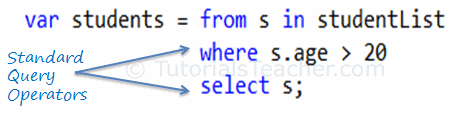
Standard Query Operators in LINQ are actually extension methods for the IEnumerable<T> and IQueryable<T> types. They are defined in the System.Linq.Enumerableand System.Linq.Queryable classes. There are over 50 standard query operators available in LINQ that provide different functionalities like filtering, sorting, grouping, aggregation, concatenation, etc.

Standard Query Operators in Query Syntax


Standard Query Operators in Query Syntax

Standard Query Operators in Method Syntax


Standard Query Operators in Method Syntax

Standard query operators in query syntax is converted into extension methods at compile time. So both are same.
Standard Query Operators can be classified based on the functionality they provide. The following table lists all the classification of Standard Query Operators:
ClassificationStandard Query Operators
FilteringWhere, OfType
SortingOrderBy, OrderByDescending, ThenBy, ThenByDescending, Reverse
GroupingGroupBy, ToLookup
JoinGroupJoin, Join
ProjectionSelect, SelectMany
AggregationAggregate, Average, Count, LongCount, Max, Min, Sum
QuantifiersAll, Any, Contains
ElementsElementAt, ElementAtOrDefault, First, FirstOrDefault, Last, LastOrDefault, Single, SingleOrDefault
SetDistinct, Except, Intersect, Union
PartitioningSkip, SkipWhile, Take, TakeWhile
ConcatenationConcat
EqualitySequenceEqual
GenerationDefaultEmpty, Empty, Range, Repeat
ConversionAsEnumerable, AsQueryable, Cast, ToArray, ToDictionary, ToList

Anatomy of the Lambda Expression

C# 3.0(.NET 3.5) introduced the lambda expression along with LINQ. The lambda expression is a shorter way of representing anonymous method using some special syntax.
For example, following anonymous method checks if student is teenager or not:
Example: Anonymous Method in C#
delegate(Student s) { return s.Age > 12 && s.Age < 20; };
Example: Anonymous method in VB.Net
Dim isStudentTeenAger = Function(s As Student) As Boolean
                                    Return s.Age > 12 And s.Age < 20
                        End Function
The above anonymous method can be represented using a Lambda Expression in C# and VB.Net as below:
Example: Lambda Expression in C#
s => s.Age > 12 && s.Age < 20
Example: Lambda Expression in VB.Net
Function(s) s.Age  > 12 And s.Age < 20
Let's see how the lambda expression evolved from the following anonymous method.
Example: Anonymous method in C#
delegate(Student s) { return s.Age > 12 && s.Age < 20; };
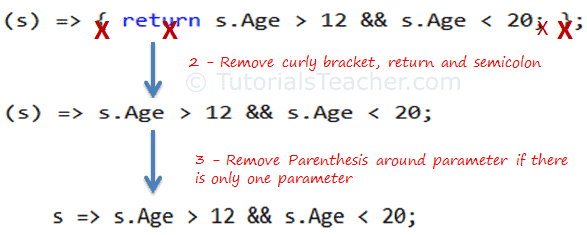
The Lambda expression evolves from anonymous method by first removing the delegate keyword and parameter type and adding a lambda operator =>.

Lambda Expression from Anonymous Method

The above lambda expression is absolutely valid, but we don't need the curly braces, return and semicolon if we have only one statement that returns a value. So we can eliminate it.
Also, we can remove parenthesis (), if we have only one parameter.

Lambda Expression from Anonymous Method

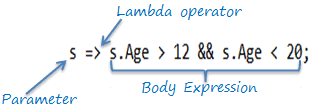
Thus, we got the lambda expression: s => s.Age > 12 && s.Age < 20 where s is a parameter, => is the lambda operator and s.Age > 12 && s.Age < 20 is the body expression:

Lambda Expression Structure in C#

Same way we got lambda expression in VB.Net can be written as below:

Lambda Expression Structure in VB.Net

The lambda expression can be invoked same way as delegate using ().
 Note:
VB.Net doesn't support lambda operator =>

Lambda Expression with Multiple Parameters

You can wrap the parameters in parenthesis if you need to pass more than one parameter, as below:
Example: Specify Multiple Parameters in Lambda Expression C#
(s, youngAge) => s.Age >= youngage;
You can also give type of each parameters if parameters are confusing:
Example: Specify Parameter Type
(Student s,int youngAge) => s.Age >= youngage;
Example: Specify Multiple Parameters in Lambda Expression VB.Net
Function(s, youngAge) s.Age >= youngAge

Lambd Expression without Parameter

It is not necessary to have atleast one parameter in a lambda expression. The lambda expression can be specify without any parameter also.
Example: Lambda Expression without Parameter
() => Console.WriteLine("Parameter less lambda expression")

Multiple Statements in Lambda Expression Body

You can wrap expressions in curly braces if you want to have more than one statement in the body:
Example: Multi Statements Lambda expression C#
(s, youngAge) =>
{
  Console.WriteLine("Lambda expression with multiple statements in the body");
    
  Return s.Age >= youngAge;
}
Example: Multi Statements Lambda Expression VB.Net
Function(s , youngAge)
    
    Console.WriteLine("Lambda expression with multiple statements in the body")
    
    Return s.Age >= youngAge

End Function

Declare Local Variable in Lambda Expression Body

You can declare a variable in the expression body to use it anywhere in the expression body, as below:
Example: Local Variable in Lambda expression C#
s =>
{
   int youngAge = 18;

    Console.WriteLine("Lambda expression with multiple statements in the body");

    return s.Age >= youngAge;
}
Example: Local Variable in Lambda Expression VB.Net
Function(s) 
                                      
        Dim youngAge As Integer = 18
            
        Console.WriteLine("Lambda expression with multiple statements in the body")
            
        Return s.Age >= youngAge
            
End Function
Lambda expression can also be assigned to built-in delegates such as Func, Action and Predicate.

Assign Lambda Expression to Delegate

The lambda expression can be assigned to Func<in T, out TResult> type delegate. The last parameter type in a Func delegate is the return type and rest are input parameters. Visit Func delegate section of C# tutorials to know more about it.
Consider the following lambda expression to find out whether a student is a teenager or not.
Example: Lambda Expression Assigned to Func Delegate C#
Func<Student, bool> isStudentTeenAger = s => s.age > 12 && s.age < 20;

Student std = new Student() { age = 21 };

bool isTeen = isStudentTeenAger(std);// returns false
Example: Lamda Expression Assigned to Func Delegate VB.Net
Dim isStudentTeenAger As Func(Of Student, Boolean) = Function(s) s.Age > 12 And s.Age < 20

Dim stud As New Student With {.Age = 21}

Dim isTeen As Boolean = isStudentTeenAger(stud) // returns false
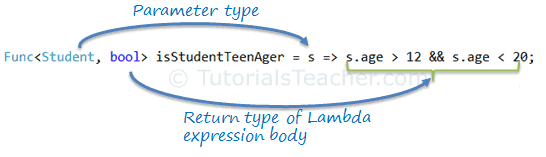
In the above example, the Func delegate expects the first input parameter to be of Student type and the return type to be boolean. The lambda expressions => s.age > 12 && s.age < 20 satisfies the Func<Student, bool> delegate requirement, as shown below:

Func delegate with Lambda Expression

The Func<> delegate shown above, would turn out to be a function as shown below.
bool isStudentTeenAger(Student s)
{
    return s.Age > 12 && s.Age < 20;
}

Action Delegate

Unlike the Func delegate, an Action delegate can only have input parameters. Use the Action delegate type when you don't need to return any value from lambda expression.
Example: Lamda Expression Assigned to Action Delegate C#
Action<Student> PrintStudentDetail = s => Console.WriteLine("Name: {0}, Age: {1} ", s.StudentName, s.Age);

Student std = new Student(){ StudentName = "Bill", Age=21};

PrintStudentDetail(std);//output: Name: Bill, Age: 21
Example: Lamda Expression Assigned to Action Delegate VB.Net
Dim printStudentDetail As Action(Of Student) = Sub(s) Console.WriteLine("Name: {0}, Age: {1} ", s.StudentName, s.Age)
    
Dim stud As New Student With {.StudentName = "Bill", .Age = 21}
        
printStudentDetail(stud)//output: Name: Bill, Age: 21

Lambda Expression in LINQ Query

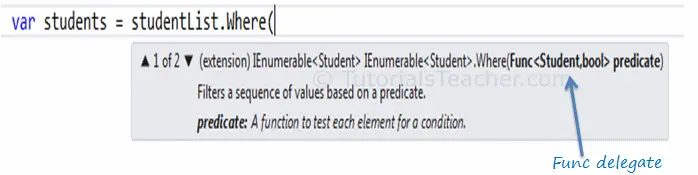
Usually lambda expression is used with LINQ query. Enumerable static class includes Where extension method for IEnumerable<T> that accepts Func<TSource,bool>. So, the Where() extension method for IEnumerable<Student> collection is required to pass Func<Student,bool>, as shown below:

Func delegate parameter in Where extension method

So now, you can pass the lambda expression assigned to the Func delegate to the Where() extension method in the method syntax as shown below:
Example: Func Delegate in LINQ Method Syntax
IList<Student> studentList = new List<Student>(){...};

Func<Student, bool> isStudentTeenAger = s => s.age > 12 && s.age < 20;

var teenStudents = studentList.Where(isStudentTeenAger).ToList<Student>();
Example: Func Delegate in LINQ Query Syntax
IList<Student> studentList = new List<Student>(){...};

Func<Student, bool> isStudentTeenAger = s => s.age > 12 && s.age < 20;

var teenStudents = from s in studentList
                   where isStudentTeenAger(s)
                   select s;
You can follow the same method in VB.Net to pass Func delegate.
 Points to Remember :
  1. Lambda Expression is a shorter way of representing anonymous method.
  2. Lambda Expression syntax: parameters => body expression
  3. Lambda Expression can have zero parameter.
  4. Lambda Expression can have multiple parameters in parenthesis ().
  5. Lambda Expression can have multiple statements in body expression in curly brackets {}.
  6. Lambda Expression can be assigned to Func, Action or Predicate delegate.
  7. Lambda Expression can be invoked in a similar way to delegate.

ref Keyword Vs out Keyword

ref Keyword Vs out Keyword The  ref  modifier means that: The value is already set and The method can read and modify it. The  ou...